
One Year Later: shortdocs.ai
I came back to migrate shortdocs.ai to a cheaper VPS and found the project I thought I had built well. CI/CD, observability, security, tests... then the switch from DigitalOcean to OVH.
I created shortdocs more than a year ago. It was the project that made me a way better engineer back then, still wasn't that good! But everyone needs a ramp to start. AI back then was not that great (to say the least), so I had to write all the code by myself, from backend to frontend, and it was such a joy seeing this creation take shape step by step. In the end I was able to make it! Or at least, I thought I had done such a great job.
It was one of my first projects and my research background didn't help much when it came to production systems. Having to learn all by myself from scratch is like reinventing the wheel, but that is how it is.
The project always worked well, so I hadn't really gone back to it in a while. But lately I needed to buy a VPS at work from OVH and saw an incredible deal: roughly the same CPU and RAM as the DigitalOcean VPS I was using, at one-fifth of the price! So I thought yeah, I need to migrate this.
I came back to the project and realised it was not the great project I imagined at the time:
- CI/CD was not great at all. At the time I was using a bash script that packed the project into a tar file, copied it to the VPS over SSH, and built all the Docker images on the machine.
- Observability was not ideal. I had an email setup in Django that was supposed to notify me about server errors (turned out it had stopped working two months earlier!)
- Security should have been better. I ran an AI-assisted security review with DeepSeek, which is pretty unrestricted when it comes to this, and found more than I expected. I then validated each finding against the code before fixing it.
- Meaningful tests basically weren't there.
The medicine
Given the experience I was able to gain with time, I took the project and changed all of this:
- CI/CD is not a nightmare anymore. I have a GitHub Action that runs the quality checks, builds the production images, and uploads them to ghcr.io. The workflow only runs when I push a version tag, so normal commits do not trigger a production deployment. Then I use Portainer (surprisingly not that popular) to pull the images and redeploy the project.
- Observability: a big thanks to @sentry, one of the best products out there. An insane amount of work solved by a pretty simple integration, connected to all of my projects for free! Insane value. Now I can monitor errors across Django, Celery and also Next.js.
- I fixed all the vulnerabilities found in the review, across both the backend and frontend, then set up the Cloudflare firewalling + Tailscale. This combination is so good and pretty easy to set up, thanks @levelsio for the idea :D
- I pretty much covered all the critical behaviour with tests. AI now writes more than enough tests, even stupid ones, but that is good for me, I can always remove them later. Nothing bad in having more tests than necessary (better than having less!)

The migration itself
Basically what I needed to do was recreate all the containers on the new VPS and also make sure the certificate would not break. The good news was that user uploads and generated summary PDFs live in S3 and the application images are built in CI and pushed to a registry. So this wasn't moving gigabytes around.
To do this, I installed Docker and Portainer on the new machine, created the stack of my project, set the secrets, and pulled the images. The images were already built by CI and sitting in the registry, so Portainer only pulled and started them. For the secrets, I reconstructed the environment from the running containers on the old host.
This way I had both stacks running, although the new one wasn't receiving public traffic yet:
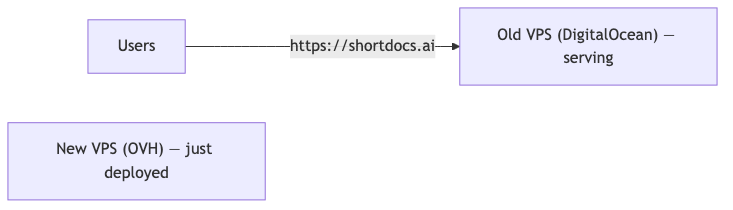
With the stack running on the new machine and everything looking healthy, it was time to point traffic at it.
The certificate was the other piece that could cause trouble. I copied the existing certificates to the new machine and renewed them with a DNS challenge before any traffic moved. A DNS challenge works even while the domain still points at the old server, so the new machine could hold a fresh certificate before a single visitor was sent to it. Good thing I did: the old certificate was about to expire in just three days :) After the migration I also moved renewal to Cloudflare's DNS challenge and added a systemd timer, so this isn't another thing waiting to silently expire without me asking why my site doesn't have a valid certificate.
Before changing DNS, I temporarily used the old VPS as a reverse proxy to the new one:

This way, if there was any error, I could easily roll back by removing the proxy instead of waiting for DNS to propagate. When everything seemed alright, I then made the final switch: I moved the authoritative nameservers from DigitalOcean to Cloudflare and proxied the site to the new OVH origin. Because DNS doesn't update everywhere at once, both machines were working in parallel for a while. Users with the new DNS records reached the OVH VPS through Cloudflare, while anyone still using the old cached records reached the DigitalOcean VPS, which proxied their requests to OVH. As those caches expired, traffic to the old machine slowly dropped to zero.

And once the old machine stopped receiving traffic, the migration was complete:

I still kept the old machine live for a few days before turning it off, so if anything went wrong, I could point Cloudflare back to it quickly.
A few extra layers went on after the switch: Cloudflare in front of everything, a firewall at the origin that only accepts public web traffic from Cloudflare, and Tailscale for the admin surfaces.
Coming back to the project was humbling, but it also showed me how much the way I build and think about things has changed.
Hoping to be humbled again!